Best GPUs for Streaming: Top Picks for Every Budget |
Streaming looks easy from the outside; you just hit “Go Live” and play, right? In reality, choosing the wrong GPU is the fastest way to kill your stream quality before a single viewer shows up. Choppy frames, blurry encode, dropped bitrate, it all starts with the hardware. If you’re serious about streaming, picking the best GPUs for streaming is the single most important hardware decision you’ll make. This guide breaks down exactly what to look for, reviews the top graphics cards available right now, and helps you find the perfect pick for your budget and use case. Whether you want to stream Fortnite in 1080p or broadcast 4K cinematic gameplay, there’s a card here for you.
What Is Streaming and Why Does Your GPUs Matter?
Live streaming means broadcasting your gameplay, creative work, or content in real-time to platforms like Twitch, YouTube, or Kick. Unlike recording a video you can edit later, streaming demands that your PC simultaneously runs a game, encodes video, and pushes that data to a server, all with zero lag.
Your GPU handles three things at once during a stream:
- Rendering frames — running the game smoothly so it looks good for you
- Encoding video — compressing your gameplay into a stream your internet can handle
- Driving your display — pushing pixels to your monitor without stutter
Modern GPUs from NVIDIA and AMD come with dedicated hardware encoders (NVENC and AMF, respectively) that handle encoding without hurting game performance. Intel’s Arc cards also include AV1 hardware encoding. These on-chip encoders are what separate a great streaming GPU from a mediocre one.
Quick fact: NVIDIA’s NVENC encoder (found in RTX 30 and 40 series) consistently delivers broadcast-quality H.264 and AV1 encoding with near-zero CPU overhead — making it a top choice for streamers who want quality without performance trade-offs.
Key Features to Look for in the Best Streaming GPUs
Before you spend a dollar, understand these six factors:
1: Hardware Encoder Quality
- Look for NVENC (NVIDIA), AMF (AMD), or QuickSync/XeSS (Intel). NVENC on RTX cards is best-in-class.
2: VRAM Amount
- 8GB is the minimum for 1080p streaming. For 1440p or 4K streaming with modern titles, aim for 12–16GB.
3: Resolution Support
- Can the card run your game at high FPS while streaming? 1080p60 is table stakes; 1440p or 4K needs more horsepower.
4: Thermal Design
- Streaming runs your GPU hot for hours. Cards with better cooling sustain performance longer without throttling.
5: Power Efficiency
- Higher wattage means higher electricity cost and heat. Balance performance with TDP for your setup.
6: Price-to-Performance
- You don’t always need a flagship. The RTX 4060 often outperforms pricier cards, specifically for streaming tasks.
Top Best GPUs for Streaming
Here are our top picks, tested and ranked for streaming performance, encoder quality, value, and real-world use:
1. NVIDIA GeForce RTX 4070 Super
- VRAM: 12GB GDDR6X
- Encoder: NVENC 8th Gen (AV1 + H.264/H.265)
- TDP: 220W
- Target Resolution: 1440p60 – 4K30 streaming
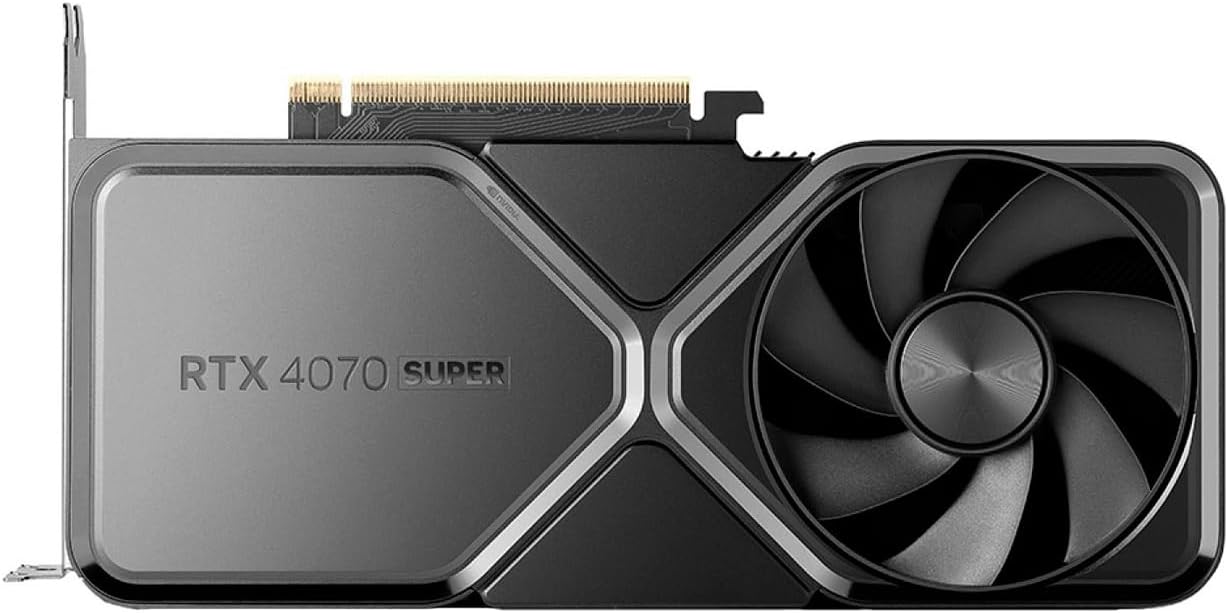
The NVIDIA GeForce RTX 4070 Super is a strong streaming GPU because it handles high-quality gameplay while keeping CPU usage low through NVIDIA’s hardware encoder. It’s especially good for 1080p and 1440p streaming, offering smooth performance, DLSS 3 support, and enough headroom for gaming, OBS, and background tasks at once.
For streamers who want excellent image quality without moving to a much pricier card, it hits a very practical sweet spot.
Pros
- Exceptional NVENC encode quality
- Handles 1440p gaming + 4K encode
- Great efficiency vs RTX 4080
- AV1 support for YouTube streaming
Cons
- Pricier than mid-range options
- 12GB VRAM can strain at 4K
- May need PSU upgrade
Best for: Streamers who want top-tier quality without spending on an RTX 4080.
2. NVIDIA GeForce RTX 4060Ti
- VRAM: 8GB GDDR6
- Encoder: NVENC 8th Gen
- TDP: 115W — extremely efficient
- Target Resolution: 1080p60 – 1440p30 streaming
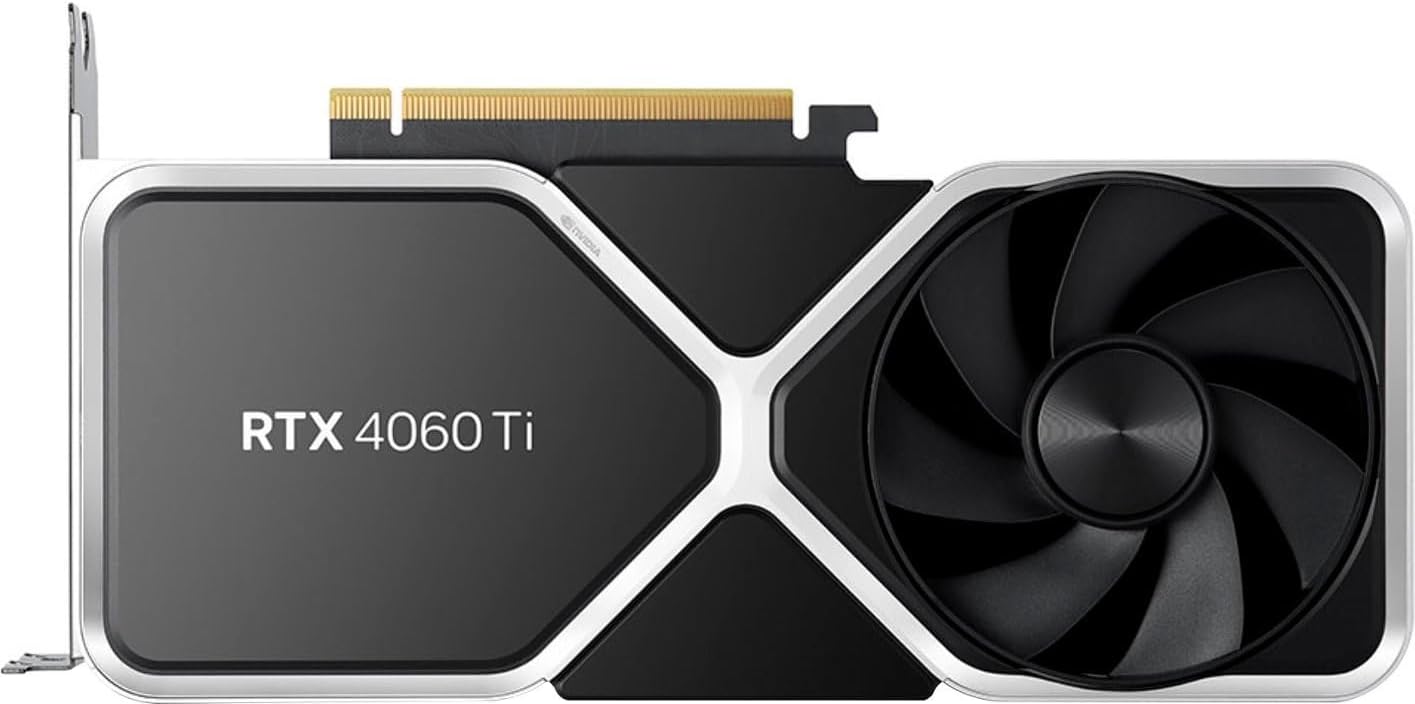
The NVIDIA GeForce RTX 4060 Ti is a solid streaming GPU for 1080p creators, thanks to NVIDIA’s NVENC encoder and AV1 support, which help deliver smooth, efficient broadcasts with good image quality. It can handle gaming and streaming together well at 1080p, and its power efficiency makes it a practical choice for compact builds.
For 1440p streaming or heavier games, it is more of a budget-friendly option than a long-term powerhouse, so users wanting extra headroom may prefer the RTX 4070 Super.
Pros
- AV1 encoding for under $300
- Runs cool and quiet all day
- Excellent 1080p streaming quality
- Low power draw — good for small setups
Cons
- 8GB VRAM limits future games
- Not ideal for 4K gaming
- Narrow 128-bit memory bus
Best for: New streamers and creators on a tight budget who stream at 1080p60.
3. NVIDIA GeForce RTX 4080 Super
- VRAM: 16GB GDDR6X
- Encoder: NVENC 8th Gen (Dual encoders)
- TDP: 320W
- Target Resolution: 4K60 streaming + gaming

The NVIDIA GeForce RTX 4080 Super is one of the best GPUs for streaming because it combines top-tier gaming performance with excellent NVENC encoding support, including AV1 support for higher-quality at lower bitrates. It’s especially strong for 1440p and 4K streamers who want smooth gameplay, low CPU load, and cleaner video output.
Among high-end options, it stands out as a premium single-PC streaming choice, while the RTX 4070 Super is a better value, and the RTX 4060 Ti suits lighter 1080p setups.
Pros
- Dual NVENC encoders
- 16GB VRAM for any workload
- 4K gaming + 4K streaming simultaneously
- Future-proof for years
Cons
- Very high price
- Needs high-end PSU (850W+)
- Overkill for 1080p streaming
Best for: Full-time professional streamers and content creators.
4. AMD Radeon RX 7900 GRE
- VRAM: 16GB GDDR6
- Encoder: AV1 + H.264/H.265 via AMF
- TDP: 260W
- Target Resolution: 1440p60 streaming

The AMD Radeon RX 7900 GRE is a strong streaming GPUs for gamers who want 1440p performance plus modern encoding support. It includes AV1 encode/decode and a new media engine that helps deliver efficient, high-quality streams in OBS while keeping gameplay smooth.
It’s 16GB of VRAM also gives extra breathing room for demanding games, textures, and multitasking. For streamers who prefer AMD, it is a very capable single-PC option, though NVIDIA still has the edge in some creator-focused workflows.
Pros
- 16GB VRAM at a mid-range price
- Great rasterisation performance
- AV1 encode support
- Open-source driver ecosystem
Cons
- AMF encoder trails NVENC in quality
- Weaker ray tracing vs RTX cards
- OBS integration less polished
Best for: AMD loyalists or those who want massive VRAM at a fair price.
5. NVIDIA GeForce RTX 3060
- VRAM: 12GB GDDR6
- Encoder: NVENC 7th Gen
- TDP: 170W
- Target Resolution: 1080p60 streaming
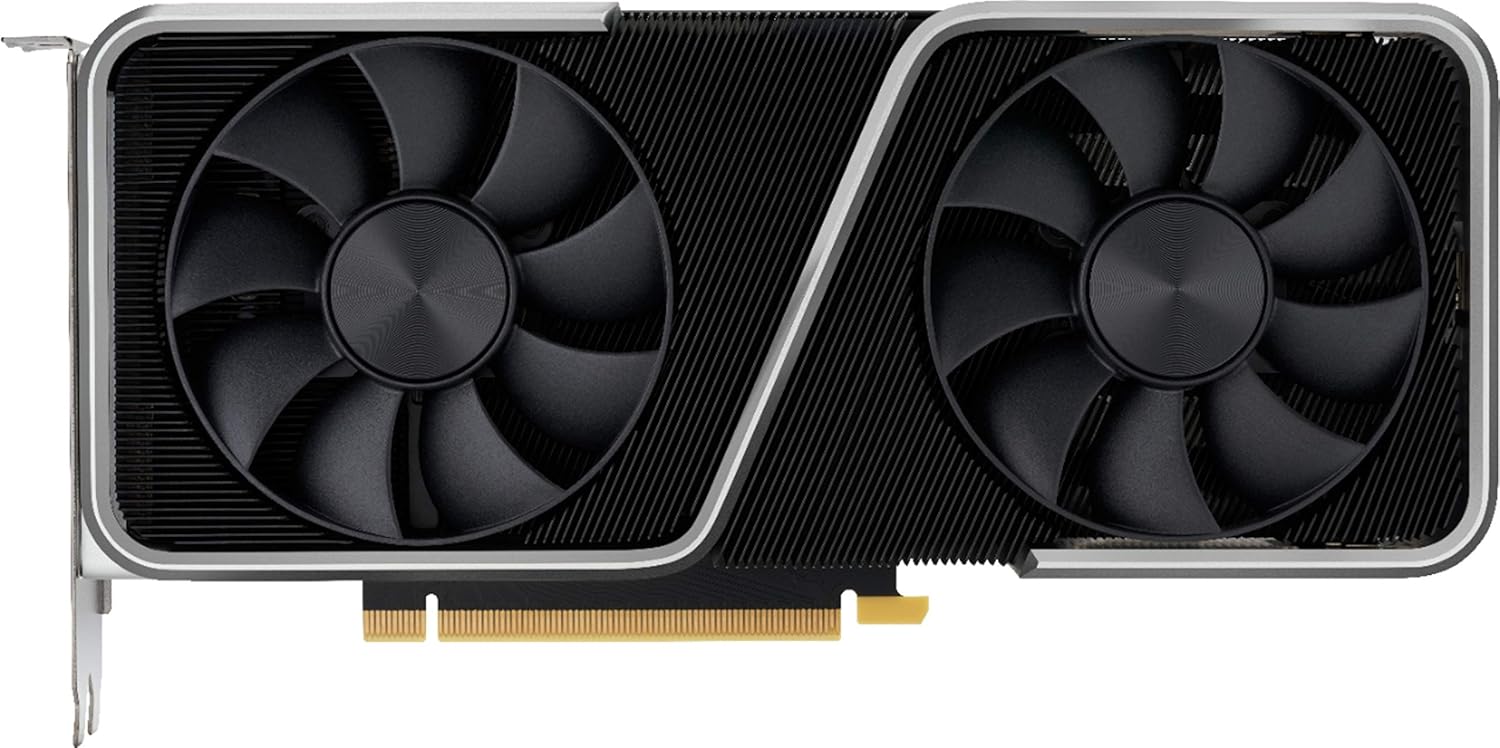
The NVIDIA GeForce RTX 3060 is still a good budget streaming GPU, especially for 1080p gaming and live broadcasts. Its NVENC encoder helps reduce CPU load, so you can stream smoothly while keeping gameplay responsive, and the 12GB model offers extra breathing room for modern titles and multitasking. For casual creators, it delivers solid value. If you want higher-resolution streaming or more future-proof performance, newer cards like the RTX 4070 Super or RTX 4080 Super are stronger choices.
Pros
- Excellent NVENC quality for the price
- 12GB VRAM is generous
- Widely available secondhand
- Rock-solid 1080p60 streaming
Cons
- No AV1 support
- Older architecture
- Struggles at 4K gaming
Best for: Streamers on a tight budget who want proven NVENC reliability.
6. Intel Arc A770
- VRAM: 16GB GDDR6
- Encoder: AV1 hardware encode (best-in-class bitrate efficiency)
- TDP: 225W
- Target Resolution: 1080p60 – 1440p60 streaming

The Intel Arc A770 is a strong streaming GPU for budget-conscious creators who want AV1 hardware encoding and solid 1080p or 1440p gaming performance. It’s 16GB of VRAM helps with modern games and multitasking, while Intel’s media engine can produce efficient, clean-looking streams at lower bitrates.
It is best for users willing to tweak drivers and OBS settings for the smoothest experience, since AMD and NVIDIA still have more mature streaming ecosystems. For value-focused streamers, though, it is an impressive option.
Pros
- Outstanding AV1 encode quality
- 16GB VRAM at a bargain price
- Great for YouTube streamers using AV1
- Improved drivers in 2024–2025
Cons
- Weaker raw gaming performance vs Nvidia
- Driver maturity is still catching up
- Some game compatibility issues
Best for: YouTube streamers who use AV1 encoding and want 16GB VRAM cheaply.
7. NVIDIA GeForce RTX 4070 Ti Super
- VRAM: 16GB GDDR6X
- Encoder: NVENC 8th Gen
- TDP: 285W
- Target Resolution: 4K gaming + 1440p streaming

The NVIDIA GeForce RTX 4070 Ti Super is one of the strongest GPUs for streaming available today. Packing 16GB of GDDR6X VRAM and NVIDIA’s 8th-gen NVENC encoder, it handles 4K gaming and 1440p streaming simultaneously without breaking a sweat. AV1, H.264, and H.265 encoding are all supported, making it equally capable on Twitch, YouTube, and Kick. At 285W TDP, it runs efficiently for extended streaming sessions. DLSS 3.5 keeps framerates high even in demanding titles. It sits perfectly between the RTX 4070 Super and RTX 4080 Super in price and power, a serious card for serious streamers.
Pros
- 16GB VRAM headroom
- 8th-gen NVENC — flawless encode
- Exceptional 4K gaming performance
- DLSS 3.5 for frame gen
Cons
- Expensive (close to 4080 Super pricing)
- High power draw
Best for: Streamers who play demanding AAA titles at 4K while broadcasting.
8. AMD Radeon RX 7600 XT
- VRAM: 16GB GDDR6
- Encoder: AV1 via AMF
- TDP: 165W
- Target Resolution: 1080p60 streaming

The AMD Radeon RX 7600 XT is a surprisingly capable budget pick for streamers. Offering 16GB of GDDR6 VRAM at an entry-level price, it punches well above its weight class. Built on AMD’s RDNA 3 architecture, it supports AV1 hardware encoding via AMF, delivering clean 1080p60 streams to Twitch and YouTube without taxing your CPU. At just 165W TDP, it runs cool and quiet during long sessions, making it ideal for small form factor builds. While its gaming performance trails the RTX 4060 at equivalent pricing, the generous VRAM headroom gives it real longevity. A smart, budget-conscious choice for new streamers entering the space.
Pros
- 16GB VRAM for a budget card
- Low power draw
- Affordable entry point for AMD users
Cons
- AMF encoder is not as polished
- Weaker gaming performance than RTX 4060
Best for: Casual streamers in an AMD ecosystem on a budget.
9. NVIDIA GeForce RTX 4090
- VRAM: 24GB GDDR6X
- Encoder: NVENC 8th Gen (Dual)
- TDP: 450W
- Target Resolution: 4K120 gaming + 4K streaming
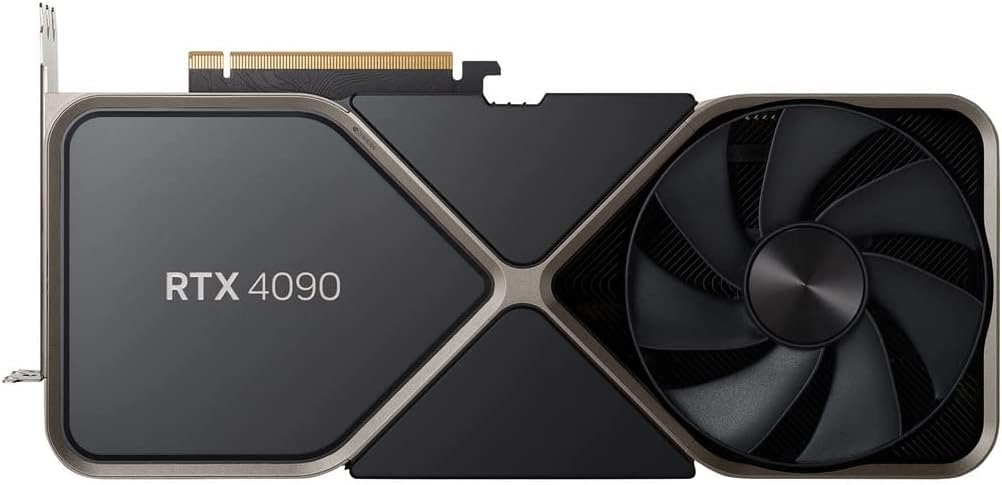
The NVIDIA GeForce RTX 4090 is the undisputed king of streaming GPUs. Armed with 24GB of GDDR6X VRAM and dual 8th-gen NVENC encoders, it simultaneously handles 4K120 gaming and 4K streaming without compromise. AV1, H.264, and H.265 encoding are all supported at the highest quality settings, delivering broadcast-grade output on every platform. It’s 450W TDP demands a premium PSU and robust cooling, but the performance return is unmatched. DLSS 3.5 with Frame Generation keeps framerates stratospheric even in the most demanding titles.
For full-time professional streamers, content creators, and VR broadcasters who refuse to compromise, the RTX 4090 is simply the best money can buy.
Pros
- Absolute top-tier gaming + streaming
- 24GB VRAM for AI/creative tools
- Future-proof for 5+ years
Cons
- Very high cost
- 450W TDP needs a premium PSU and cooling
- Overkill for 99% of streamers
Best for: Professional streamers and content creators with no budget limit.
Comparison Table: Best GPUs For Streaming
Here’s how all 10 GPUs stack up at a glance:
| GPU | VRAM | Encoder | Price Range | Best For | Rating |
|---|---|---|---|---|---|
| RTX 4070 Super | 12GB | NVENC 8th | ~$599 | Overall best | ★★★★★ |
| RTX 4060Ti | 8GB | NVENC 8th | ~$299 | Budget 1080p | ★★★★★ |
| RTX 4080 Super | 16GB | NVENC 8th (Dual) | ~$999 | Professional use | ★★★★★ |
| RX 7900 GRE | 16GB | AMF AV1 | ~$499 | AMD mid-high | ★★★★★ |
| RTX 3060 | 12GB | NVENC 7th | ~$220 | Used market value | ★★★★★ |
| Arc A770 | 16GB | AV1 (best-in-class) | ~$280 | AV1 YouTube streams | ★★★★★ |
| RTX 4070 Ti Super | 16GB | NVENC 8th | ~$799 | 4K gaming + stream | ★★★★★ |
| RX 7600 XT | 16GB | AMF AV1 | ~$239 | AMD budget | ★★★★★ |
| RTX 4060 Ti | 8/16GB | NVENC 8th | ~$399 | 1440p mid-range | ★★★★★ |
| RTX 4090 | 24GB | NVENC 8th (Dual) | ~$1,999 | No-limit flagship | ★★★★★ |
Best Streaming GPUs Buying Guide
Use these practical tips to narrow down the GPUs for streaming in your specific situation:
Start with your streaming resolution:
The most important question: at what resolution and framerate will you stream?
- 1080p60 streaming: RTX 4060, RTX 3060, Arc A770, RX 7600 XT
- 1440p60 streaming: RTX 4070 Super, RTX 4060 Ti (16GB), RX 7900 GRE
- 4K streaming: RTX 4080 Super, RTX 4070 Ti Super, RTX 4090
Choose your platform first:
Different streaming platforms support different codecs:
- Twitch: H.264 or H.265 — any NVENC card works great
- YouTube: AV1 support gives significantly better quality at lower bitrates — prioritise AV1-capable cards
- Kick: H.264 is standard — any modern GPU handles it
NVENC vs AMF vs QuickSync — which encoder wins?
- In blind tests, NVIDIA’s NVENC (8th generation) consistently produces the sharpest, most detailed stream output at equivalent bitrates. AMD’s AMF has improved dramatically since 2023 — it’s a viable choice. Intel’s QuickSync AV1 encoder actually outperforms both at AV1 encode specifically. For H.264/H.265 streaming, NVENC is the clear winner.
Don’t forget your CPU:
- Even the best GPUs for streaming won’t save you if your CPU is a bottleneck. Modern hardware encoding handles video compression, but your CPU still has to run the game, manage OBS, and handle audio. Aim for at least a Ryzen 5 7600 or Core i5-13600K as a companion CPU.
Common Mistakes to Avoid
⚠️Using software encoding instead of hardware encoding. Software (x264) looks great, but hammers your CPU and drops frames in demanding games. Always use NVENC, AMF, or QuickSync.
⚠️Buying 8GB VRAM in 2025. Modern games like Cyberpunk 2077 and Alan Wake 2 routinely exceed 8GB VRAM at high settings. For future-proofing, aim for 12GB minimum.
⚠️Ignoring your bitrate limits. Even the best GPU can’t overcome a slow internet connection. Your stream quality is capped by the upload speed check before upgrading hardware.
⚠️Overestimating what you need. Most streamers don’t need a $1,000 GPU. The RTX 4060 handles 1080p60 streaming brilliantly. Don’t overspend if you’re not broadcasting in 4K.
⚠️Forgetting cooling and airflow. Streaming runs your GPU hard for hours. Cards with superior cooling (triple-fan designs, vapour chambers) maintain their performance longer without thermal throttling.
Future Trends in GPU Streaming Technology
The best GPUs for streaming today won’t look the same in three years. Here’s where the technology is heading, and what it means for your setup.
1: AI-Enhanced Encoding
Next-gen NVENC and AMF encoders use on-chip AI to adaptively optimise every frame in real time — reducing bitrate needs while improving perceived sharpness. NVIDIA’s RTX 50-series Blackwell GPUs already demonstrate this with neural rendering pipelines.
Impact: Better quality at lower upload speeds.
2: Cloud GPU Streaming
GPU-as-a-Service (GPUaaS) is growing rapidly. Platforms like NVIDIA CloudXR and AWS GPU instances let streamers offload rendering and encoding to remote hardware, potentially eliminating the need for a local high-end GPU for light-use streamers.
Impact: Lower hardware barrier to entry.
3: AV1 Goes Mainstream
AV1 hardware encoding is already on RTX 40-series and Intel Arc cards. As Twitch, YouTube, and Kick expand AV1 support, it will become the default streaming codec, delivering far superior quality at the same bitrate compared to H.264.
Impact: Better streams on slower internet
4: Power-Efficient Architectures
TSMC’s 3nm and 2nm process nodes (arriving in GPUs from 2025–2027) will allow significantly more performance per watt. Streaming-capable GPUs will draw less power, run cooler, and fit smaller form factors — ideal for compact streaming setups.
Impact: Better streaming on mini-PCs and laptops.
5: VR & Spatial Streaming
As VR headsets and spatial computing grow, streaming in 360° or spatial video formats will require GPUs with dedicated multi-view encoding. Cards that handle spatial audio and video simultaneously will define the next era of immersive live content.
Impact: New streaming formats demand more GPU power.
6: Explosive Market Growth
The gaming GPU market is projected to grow from $85.8B in 2025 to $219.5B by 2035 at a 9.84% CAGR. Increased competition between NVIDIA’s RTX 50-series (Blackwell), AMD’s RDNA 4, and Intel’s Arc Battlemage will drive prices down over time.
Impact: More performance per dollar for streamers.
Conclusion
Choosing the best GPUs for streaming doesn’t have to be overwhelming. The right card depends on your budget, target resolution, and preferred platform. For most streamers, the RTX 4070 Super is the sweet spot — outstanding NVENC quality, smooth 1440p gaming, and solid value. On a budget, the RTX 4060 delivers professional-grade 1080p streaming for under $300. AMD users will find the RX 7900 GRE a compelling mid-range option with generous VRAM.
Remember: your encoder matters more than raw GPU power for streaming. Prioritise cards with 8th-gen NVENC or AV1 support, ensure you have at least 12GB VRAM, and match your GPU to your actual streaming resolution — not someone else’s setup. Your viewers notice when your stream looks crisp and smooth. Invest in the right hardware, go live with confidence, and start building the audience you deserve.
People May Ask
1. What makes the RTX 4070 Super the best overall streaming GPU?
It offers 12GB VRAM, 8th-gen NVENC for near-lossless 1440p encoding, efficient 220W TDP, and smooth 4K30 streaming—balancing quality, performance, and value without RTX 4080 cost. (28 words)
2. How much VRAM do I need for 1080p vs. 4K streaming?
Minimum 8GB for 1080p60; 12-16GB for 1440p/4K to handle modern games without stuttering. Avoid 8GB in 2025 for future-proofing high settings. (26 words)
3. Is NVIDIA NVENC better than AMD AMF for streaming?
Yes, 8th-gen NVENC delivers sharper H.264/AV1 encodes with less CPU overhead than AMF. Intel’s AV1 excels for YouTube, but NVENC wins overall quality tests. (27 words)
4. What’s the best budget GPU for new 1080p streamers?
RTX 4060: 8GB VRAM, identical NVENC to flagships, 115W efficiency, under $300—perfect for smooth 1080p60 streams without high power or heat. (24 words)
5. Can I stream 4K with mid-range GPUs?
RTX 4070 Ti Super or 4080 Super handle 4K gaming + streaming via 16GB VRAM and dual NVENC. Avoid for budgets under $600; use 1440p instead.
Last Updated on 12 April 2026 by Ansa Imran

Ansa Imran, a writer, excels in creating insightful content about technology and gaming. Her articles, known for their clarity and depth, help demystify complex tech topics for a broad audience. Ansa’s work showcases her passion for the latest tech trends and her ability to engage readers with informative, well-researched pieces.